

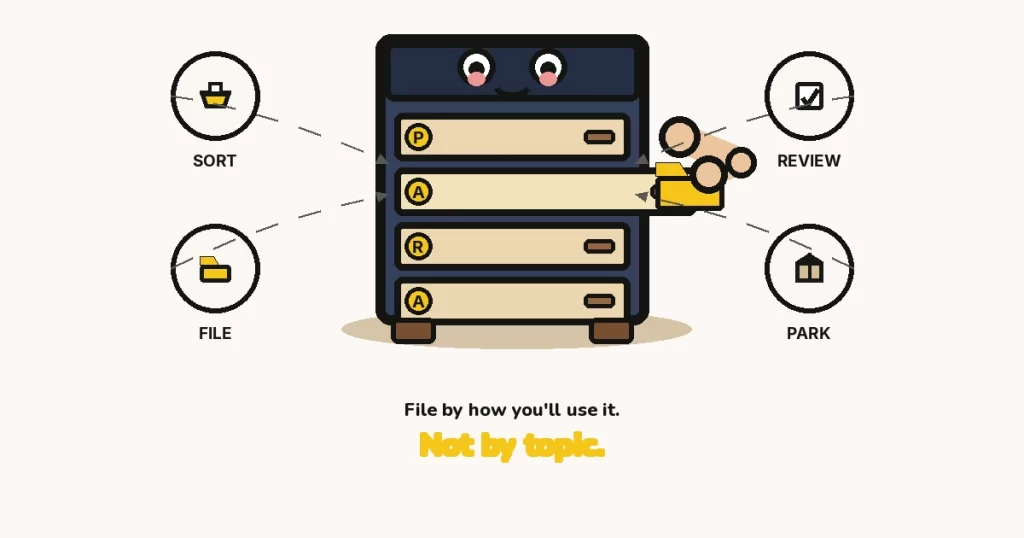
The PARA method is a four-folder filing system — Projects, Areas, Resources, Archives — that sorts notes and files by how you’ll use them, not by topic. Create the four buckets, dump today’s pile into a to-sort inbox, then file each item by actionability: active project, ongoing area, reference, or inactive archive.
Key takeaways
- Office workers mix two filing strategies — neat folders for retrieval and messy piles that act as a reminding system — and a digital setup that only copies the neat-folder half quietly drops the reminding job (Malone, 1983).
- Across tools, people report that information “goes into the computer and doesn’t come out”: capture is cheap, retrieval is not, unless each item has an obvious next home (Boardman & Sasse, 2004).
- When researchers offered to replace folders with search, users asked them not to — folders are a way of seeing work, not just a way of finding a file (Jones, Phuwanartnurak, Gill & Bruce, 2005).
- When information lives in an external store, people remember where it is more reliably than they remember the contents themselves, which is useful only if that store has a stable place for each item (Sparrow, Liu & Wegner, 2011).
- Offloading memory onto files, notes and folders is a normal cognitive strategy; it helps when the external system is organized and it backfires when the pile has no retrieve path (Risko & Gilbert, 2016).
What the PARA method actually is (and what it isn’t)
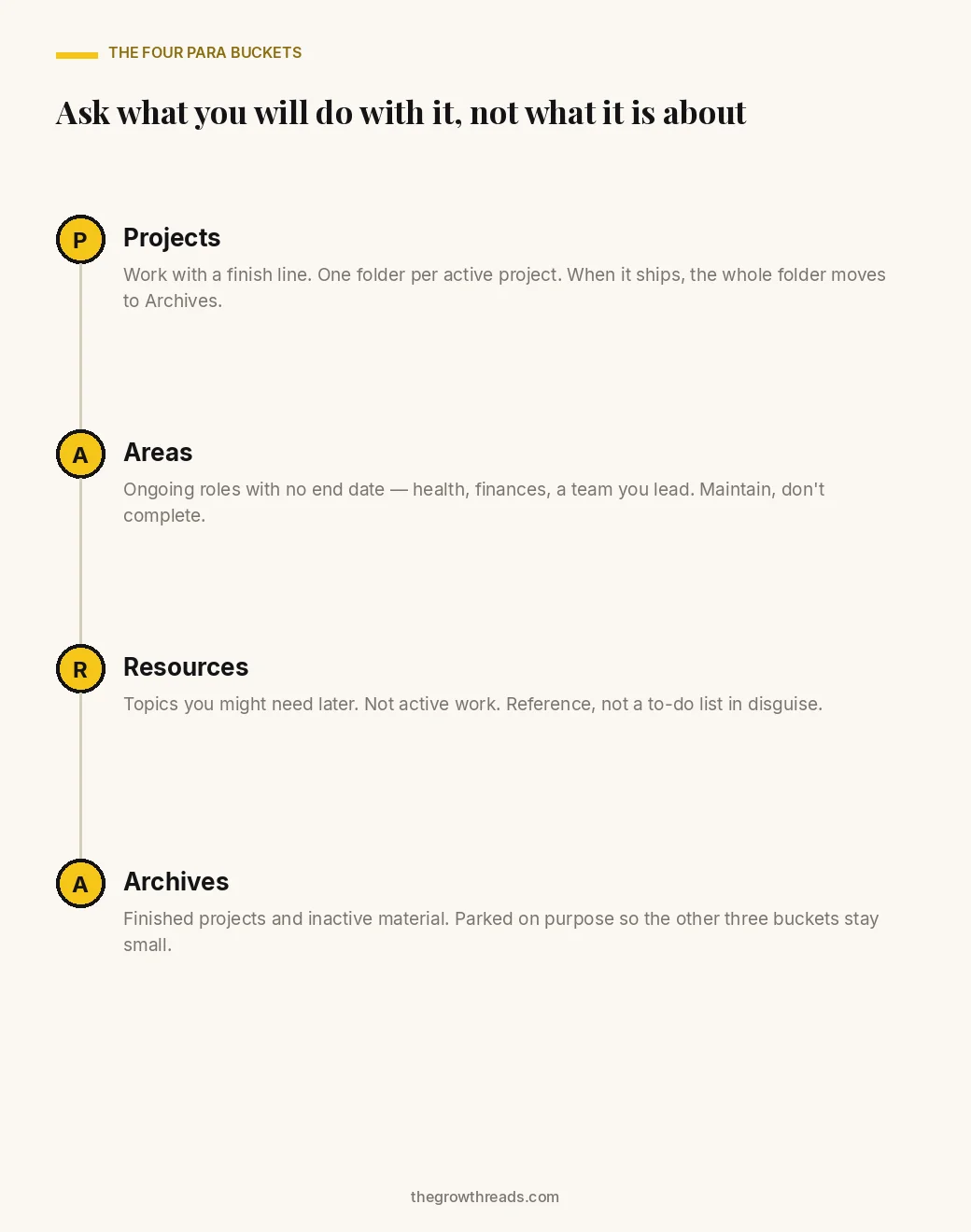
The PARA method is a four-bucket filing system for digital notes and files — Projects, Areas, Resources, Archives — that puts each item where you will next act on it, instead of where a topic label says it “belongs.” Tiago Forte published the method in 2017 as a practical answer to a very old personal-information problem: once capture is easy, retrieval is the part that fails. The four names are the entire system. Everything you keep goes in one of those four top-level folders. Nothing gets a fifth bucket “for now.”
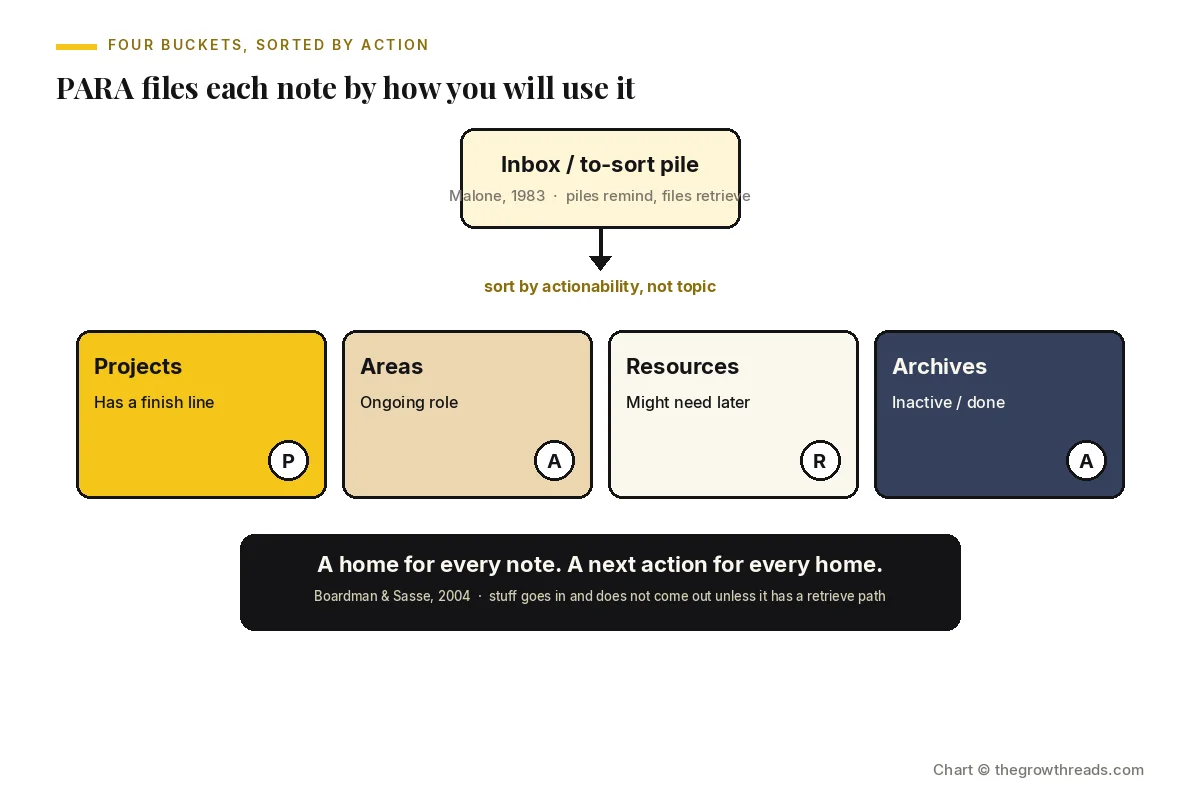
The actionability test is the part most people skip, and it is the part that makes PARA different from a tidy topic tree. A project has a finish line. An area is a role you maintain with no end date. A resource is reference you might need later. An archive is inactive on purpose. “Marketing” is a topic. “Launch the April campaign” is a project. “I run this team’s marketing” is an area. Last year’s campaign deck is an archive. The same PDF can live in three different buckets across its life; the bucket is a statement about now, not a permanent identity.
That is also why PARA is a habit, not a one-time cleanup. Left alone, Projects bloats into a graveyard of half-dead work. Treating the weekly move as a small, repeatable action — closer to a keystone habit than to a heroic weekend rebuild — is what keeps the four buckets honest.
How is PARA different from a second brain, or from smart notes?
PARA is the filing layer; a second brain is the capture-to-output workflow those folders sit inside; How to Take Smart Notes is a writing system for turning reading into atomic notes. Forte’s broader method (CODE: capture, organize, distill, express) is the loop. PARA is only the organize step, written as four folders. Sönke Ahrens’ smart-notes approach is about how a note is written so it can be reused in a draft, not about which folder the note lives in. You can run all three without mixing them: capture into an inbox, file with PARA, write with atomic notes. What you should not do is treat PARA as a replacement for capturing, or treat a Zettelkasten as a replacement for knowing which work is actually active this week.
Why the pile wins until you give it a home
Piles beat folders in daily life because a pile is a reminding system as well as a storage system, and a folder tree that only stores — with no obvious next action on each item — quietly drops the reminding job. Thomas Malone’s field study of how people actually organize desks found two complementary strategies: filing (named folders, used when you know you will need to retrieve something later) and piling (spatial stacks that keep current work in view). The pile looks messy to an outsider and is doing real cognitive work for the person who made it. Copying only the neat-folder half into Dropbox or Notion, then wondering why nothing comes back out, is the classic digital miss.
Richard Boardman and Angela Sasse later watched the same pattern on computers. People could put things in. They could not reliably get them out. Their title is the finding: stuff goes into the computer and doesn’t come out. Search helps a little; it does not replace a place you already understand. William Jones and colleagues made that concrete when they offered to replace folders with search and users said, in so many words, don’t take my folders away. A folder is a map of current work, not just an address for a file.
PARA’s bet is that you can keep the folder (the map) if you stop using topic as the map’s legend. Actionability is a smaller legend: four labels, one question.
The four failures a topic tree walks into
- Every item can sit in three topics at once. A hiring-plan spreadsheet is “hiring,” “Q3 planning,” and “team.” Topic trees force a fake primary. PARA asks which of those is the live action.
- Finished work never graduates. Last year’s “hiring” folder still sits next to this week’s, so the map of current work is lying.
- Reference masquerades as a project. Saved articles, screenshots and “read later” items look busy in a Projects list and never ship, because they were never going to.
- The inbox becomes a second brain by accident. Capture without a retrieve path is how Boardman and Sasse’s “doesn’t come out” finding shows up on a Tuesday afternoon.
Why a topic tree costs more than it feels like
A topic-based filing tree does not just waste a few minutes of hunting — it trains you to recapture the same information because you cannot trust the store, which is the expensive loop Risko and Gilbert describe as failed cognitive offloading. Offloading memory onto notes is supposed to free working memory for thinking. Sparrow, Liu and Wegner found that when people expect information to remain available in an external store, they remember the location better than the contents. That is a feature when the location is stable. It is a tax when the location is “somewhere in Downloads” or “one of four folders that could all be right.”
Mark Lansdale’s review of personal information management put the same cost in older language: the difficulty is not storage, it is classification plus reminding. If classifying an item takes more effort than the future retrieval is worth, people leave it in a pile. Digital topic trees often raise the classification cost (which of twelve nested folders?) without raising retrieval confidence. PARA cuts the classification cost to four options and makes the reminding job explicit: active work lives in Projects, where you will see it.
The honest limit, which this page will not talk past: there is no randomized trial of PARA. Forte’s method is a practitioner system. The research below is about the problem PARA is aimed at — piles versus files, capture versus retrieval, folders versus search, offloading that works only when the external store is organized — not a clinical test of these four folder names. Treat the six steps as a well-motivated filing habit, not as a law of cognition. Related work on productivity systems and summaries is useful here precisely because no single method owns the whole problem.
The four ways a PARA setup gets built wrong — and the fix for each
Most abandoned PARA folders were not abandoned because four buckets are too few. They were built as one of these four variants, each of which reintroduces the original retrieve-path failure under a new label.
| Pattern | What it looks like | The mechanism underneath | The fix that works |
|---|---|---|---|
| Topic PARA | Top-level folders named by subject (“Finance,” “Writing,” “Health”) with PARA labels used as decoration inside them | Classification cost stays high; Malone’s reminding job still has no dedicated place | Four top-level buckets only. Topics live as names of project or resource folders inside those buckets, never as a competing tree |
| Inbox forever | A to-sort folder that is 400 items deep; PARA folders stay empty and virtuous | Boardman & Sasse’s “goes in, doesn’t come out” — capture without a retrieve path | A 15-minute daily sort of new items only. Old backlog is a separate, slower pass (see drowning section) |
| Project/area swap | “Health” sits in Projects for two years; “Website redesign” sits in Areas because it feels like a role | Finish-line test was never applied, so active work and maintenance work share a map | If it has a finish line, it is a project. If it would still be true next year with no ship date, it is an area |
| Archive never | Projects contains 40 folders, 31 of them last touched months ago | The map of current work is lying, so you stop trusting it and start a new pile beside it | Weekly: anything without a next action this month moves to Archives as a whole folder. Do not pick files out one by one |
How to set up the PARA method: the 6-step system
Set up PARA by creating exactly four top-level folders, parking today’s mess in a temporary to-sort inbox, then filing each item by actionability — active project, ongoing area, later reference, or inactive archive — and repeating a short weekly pass so finished work actually leaves Projects. Do not rebuild your whole disk first. The method starts working when new items have a home; the backlog can follow at a slower pace.
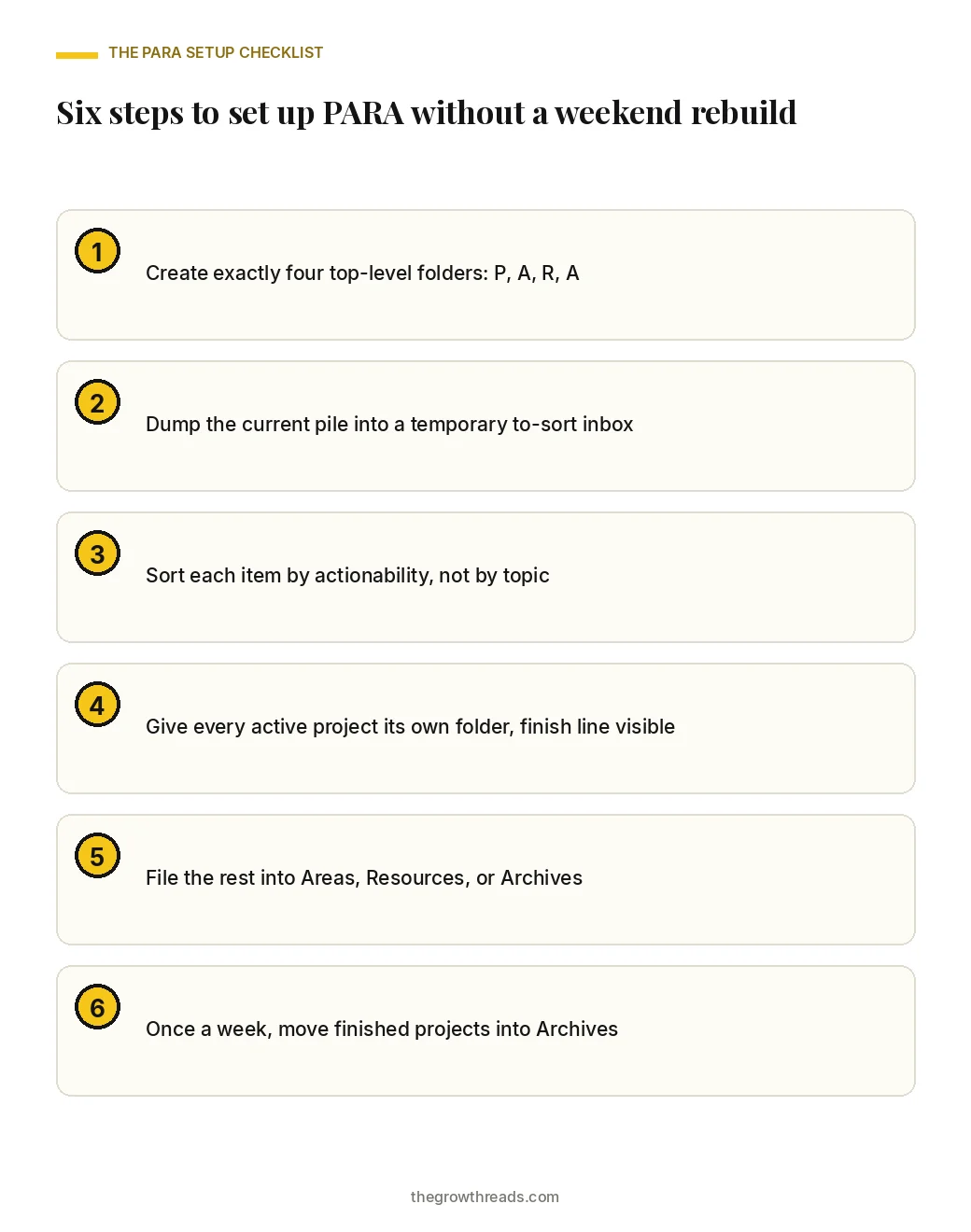
Step 1 — Create exactly four top-level folders: Projects, Areas, Resources, Archives
Pick one place that already holds most of your working files — the notes app, the cloud drive, or the documents folder, not all three at once. Create four folders with those exact names and no others at that level. A fifth folder named “Misc” or “Admin” is how PARA dies in week one: it becomes the new pile. If a tool forces extra top-level items (an Inbox, a Journal), treat those as capture surfaces, not as a fifth filing bucket. Jones and colleagues’ folder research is the reason to keep the map small and visible: you are building a picture of current work, not a library of everything you have ever touched.
Step 2 — Dump the current pile into a temporary to-sort inbox
Move the existing desktop, downloads and “untitled notes” heap into one folder called to-sort, sitting next to the four PARA buckets, not inside them. Do not organize during the dump. Malone’s pile is useful as a reminding system only while you can still see it; a half-sorted dump is neither a pile nor a file. The dump should take minutes. Its job is to make the four buckets the only “real” homes, so new work has somewhere to land tomorrow even if the backlog is still sitting in to-sort.
Step 3 — Sort each item by actionability, not by topic
For each item, ask one question: what will I do with this next? If you are actively trying to finish it, it is a project. If you are responsible for keeping it healthy with no ship date, it is an area. If you might need it later and you are not doing anything with it this month, it is a resource. If it is done, stale, or only useful as history, it is an archive. When two answers feel true, pick the more active one; you can demote it later. Do not invent a topic folder to resolve the tie. Classification cost is the failure mode Lansdale flagged — if sorting an item takes longer than using it, you will stop sorting.
Step 4 — Give every active project its own folder, with the finish line visible
Inside Projects, one folder per live project, named so a stranger (future you, on a tired Thursday) can see the outcome: “Ship April campaign,” not “Campaign stuff.” If you cannot name a finish line, it is not a project yet — park it in Areas or Resources until it has one. Keep the active set small enough that you can scan it. A sibling method for capping the day’s work is the 1-3-5 rule; PARA caps the inventory of open work, not the day’s task list. When a project ships, the whole folder moves in Step 6. Do not scatter its files back into topic homes.
Step 5 — File the rest into Areas, Resources, or Archives
Areas get one folder per ongoing role: health, finances, a team you lead. Resources get topics you consult. Archives get the finished and the cold. If you are unsure between Resources and Archives, choose Archives; you can promote it later. Whittaker and Hirschberg’s study of personal paper archives found people keep large archives because discarding the wrong thing feels costlier than storage. PARA’s job is not to delete your past. It is to stop the past sitting in the same map as this week’s work.
Step 6 — Once a week, move finished projects into Archives
Put a 15-minute weekly pass on the calendar: open Projects, move anything without a next action this month into Archives as a whole folder, and create a new project folder only when a finish line has actually appeared. This is the habit that keeps the other five steps from rotting. Boardman and Sasse’s participants did not fail at filing once; they failed at the ongoing retrieve path. A weekly move is how you stop PARA becoming a prettier version of the pile. If the pass keeps slipping, shrink it further — five minutes, Projects folder only, no backlog archaeology — rather than skipping it and promising a rebuild.
What to do when you’re already drowning in files
When the existing mess is years deep, run PARA forward from today and treat the backlog as a separate, slower queue — do not halt new work until the archaeology is finished. Create the four folders. Put new items into them starting now. Leave the old heap in to-sort. Each week, after the Projects archive pass, spend a short fixed block — 15 minutes is enough — moving a handful of old items. Stop when the timer stops. A time audit will usually show that the hunt-for-files tax is paid on this week’s work, not on 2019’s PDFs. Fix this week’s retrieve path first.
Two rules keep the backlog from infecting the live system. Do not recategorize Archives by topic “while you’re in there,” and do not open a second notes app “just until PARA is ready.” If an old folder is frozen history, move the whole thing into Archives in one drag and stop.
Common mistakes
- Filing by topic and calling it PARA. If the top level is still “Work / Personal / Finance,” you built a topic tree. Rebuild the top level as four buckets; keep topic names one level down. The second brain method article is the sibling page for capture and output — it is not a license to add a fifth top-level folder.
- Using Projects as a second to-do list. Projects hold the files for work with a finish line. They are not a substitute for a daily task cap. If the folder list is a wish list, move the unstarted items to Areas or Resources until they have a ship date.
- Never archiving. A Projects folder that only grows is a pile with labels. The weekly move in Step 6 is the whole maintenance habit; skipping it is how trust in the map collapses.
- One folder per mood. “Urgent,” “Someday,” and “Read later” are states, not PARA buckets. States change daily; buckets should not. Park read-later material in Resources or delete it.
- Waiting for the perfect app. PARA is four folders. It runs in Finder, Drive, or a notes app. App-hopping is a consistency problem, not a filing problem.
- Mixing atomic notes with folder anxiety. If the notes themselves are too coarse to reuse, that is a writing-system problem. File them in PARA anyway, then fix the note format with Ahrens — do not stall filing until every note is “permanent.”
- Sorting the entire past before filing anything new. That is the drowning pattern above. Attach the weekly pass to a calendar block instead — the same move a habit stack would use — rather than waiting for a free weekend.
When PARA isn’t the bottleneck
PARA will not fix a capture problem, a writing problem, or a too-many-projects problem — it only files what you already have, by how you will use it next. If ideas never leave your head, the gap is capture; use the second-brain loop, not more folders. If notes pile up and never become drafts, the gap is the smart-notes writing habit, not the bucket names. If Projects has 25 live finish-lines, the gap is saying no, not a fourth nested folder. Filing is a retrieve-path habit. It is the wrong tool for a decision you have been postponing, and it is the right tool once the decision exists and the files still cannot be found.
The evidence behind this system
PARA itself is a practitioner method, not a trialled intervention. The studies below are the personal-information and cognitive-offloading literature that explains why a four-bucket, actionability-first map is a reasonable filing habit — and where the evidence is thinner than a marketing page would like.
| Study | Design & size | Finding | What we used it for |
|---|---|---|---|
| Malone (1983), ACM Transactions on Office Information Systems | Qualitative field study of how office workers organized desks and files (small n; observational) | People mix filing (for retrieval) and piling (for reminding); a system that only copies the neat-folder half drops the reminding job | Why PARA keeps a visible Projects map instead of hiding all work in a deep topic tree; honest small-n caveat |
| Lansdale (1988), Applied Ergonomics | Review of the psychology of personal information management | The hard parts are classification and reminding, not storage; if classifying an item costs more than later retrieval is worth, people leave a pile | Step 3’s single actionability question, and the warning against a 12-folder decision at sort time |
| Whittaker & Hirschberg (2001), ACM TOCHI | Study of personal paper archives and why people keep them | Archives grow because the cost of throwing the wrong thing away feels higher than the cost of keeping it | Step 5’s “when unsure, Archive” rule, and the claim that PARA parks history rather than demanding a purge |
| Boardman & Sasse (2004), CHI | Cross-tool field study of personal information management | Information “goes into the computer and doesn’t come out”; capture is cheaper than retrieval unless a retrieve path exists | The Inbox-forever pattern, Step 2’s dump, and the weekly archive pass as the retrieve-path habit |
| Jones, Phuwanartnurak, Gill & Bruce (2005), CHI | Study of folder use versus search in personal information management | Users resisted replacing folders with search; folders are a way of seeing current work, not only a find mechanism | Step 1’s four visible top-level folders, and why PARA is a map rather than a search-only strategy |
| Sparrow, Liu & Wegner (2011), Science | Experimental studies on memory when information is expected to remain available on a computer | People remember where information is stored more reliably than the contents themselves (transactive memory with computers) | Why a stable home for each item matters; not used as a claim that “Google makes you stupid” |
| Bergman, Beyth-Marom, Nachmias, Gradovitch & Whittaker (2008), ACM TOIS | Studies of navigation preference in personal information management as search engines improved | People still preferred folder navigation over search for their own files, even as search got better | The case for keeping a small, trusted folder map instead of betting the system on search alone |
| Risko & Gilbert (2016), Trends in Cognitive Sciences | Review of cognitive offloading research | Offloading memory onto the environment is a normal strategy that helps when the external store is organized and hurts when it is not | The “why it costs more” section, and the framing of PARA as a retrieve-path habit rather than a personality upgrade |
Frequently asked questions
What is the PARA method?
The PARA method is a four-folder filing system for digital notes and files: Projects, Areas, Resources and Archives. Each item goes in the bucket that matches how you will use it next, not the topic it happens to be about. Tiago Forte published it in 2017 as the organize step of a larger notes workflow. The four names are the entire filing layer — there is no fifth “misc” bucket, because that fifth folder is how the original pile returns with a nicer label.
How is PARA different from just making more folders?
Ordinary folder trees multiply by topic until classification takes longer than retrieval is worth, which is the failure Lansdale described in 1988. PARA caps the top level at four buckets and uses actionability as the legend: finish-line work, ongoing roles, later reference, and inactive history. You still get named folders, which Jones and colleagues found people want to keep, but they live one level down inside a map of current work instead of competing as twelve equally plausible homes for the same PDF.
Should I put PARA in my notes app, my drive, or both?
Start in the one place that already holds most of the work you hunt for in a given week, and run the six steps there until the weekly archive pass is a habit. Splitting PARA across a notes app and a drive on day one creates two maps and a new pile in the gap between them. Once the first map is trusted, you can mirror the same four names in a second tool. Matching names matter more than matching software; the retrieve path is the habit, not the app.
What is the difference between a project and an area?
A project has a finish line you could, in principle, ship and then stop. An area is a role or standard you maintain with no end date — health, finances, a team, a craft. “Get bloodwork done this month” can be a project; “health” is an area. If a folder has been sitting in Projects for a year with no ship date, it is an area wearing the wrong label. Demote it. New finish-lines can always spawn a project folder later, which is cheaper than letting Areas and Projects lie to you about what is actually active.
Do I have to sort years of old files before PARA works?
No. Run PARA forward from today: four folders, new items sorted by actionability, weekly archive pass. Park the old heap in a to-sort folder and nibble it in short timed blocks after the live pass, not instead of it. Boardman and Sasse’s finding is about retrieve paths for what you actually need; 2019’s PDFs are rarely the hunt you pay for on a Tuesday. Completeness is how people stall the system until a mythical free weekend that never arrives.
Is PARA the same thing as a second brain?
No. A second brain, in Forte’s broader method, is the capture-organize-distill-express loop for getting ideas out of your head and back into work. PARA is only the organize step, written as four folders. You can file with PARA without running the rest of that loop, and you can capture notes without ever giving them a retrieve path. Mixing the two names is how people buy a notes app, skip filing, and then decide “PARA didn’t work” when the missing piece was the weekly move into Archives.
Where do read-later articles and screenshots go?
If you will use one this week in a live project, file it in that project’s folder. If it is reference you might want later, it goes in Resources. If you are keeping it because throwing it away feels wasteful — Whittaker and Hirschberg’s archive finding in miniature — put it in Archives or delete it. “Read later” is a mood, not a PARA bucket. A Resources folder named “read later” that only grows is the Inbox-forever pattern with better lighting, and it will not be opened next month either.
Does PARA replace search, tags, or a Zettelkasten?
No. Search still helps inside a folder. Tags can still mark status. Ahrens’ smart-notes system still governs how a note is written so it can be reused in a draft. PARA replaces the topic tree at the top of the map, not every other retrieval trick. Bergman and colleagues found people still prefer navigating their own folders even when search improves, which is an argument for a small trusted map, not an argument against search. Use search. Just stop asking it to be the only home your files have.
Related reading on The Growth Reads
The book behind the notes layer
- How to Take Smart Notes summary & review — Sönke Ahrens’ writing system for turning reading into atomic notes; the note-format companion to PARA’s filing layer
Related articles
- Keystone habits
- The second brain method
- How to stack habits
- What is consistency
- How to run a time audit
- How to learn new skills
Go deeper
How this article was researched
The Growth Reads editorial team writes from primary sources: the books themselves, the authors’ published essays and interviews, and the peer-reviewed literature behind the claims. Every study cited above was read in the original publication or its published abstract, and every figure is quoted with its design, sample and effect so you can judge its weight rather than take ours. Where a finding is genuinely limited — a small observational desk study, a review paper synthesizing other work, or a practitioner method with no trial of its own — we say so directly, rather than quietly generalizing past what the data supports.
How we work: every article on The Growth Reads is built from the books in our library plus the research they rest on, and is reviewed and date-stamped when the evidence changes. Read our full methodology.
Sources
- Malone, T. W. (1983). How do people organize their desks? Implications for the design of office information systems. ACM Transactions on Office Information Systems, 1(1), 99–112. doi:10.1145/357423.357430
- Lansdale, M. (1988). The psychology of personal information management. Applied Ergonomics, 19(1), 55–66. doi:10.1016/0003-6870(88)90199-8
- Whittaker, S., & Hirschberg, J. (2001). The character, value, and management of personal paper archives. ACM Transactions on Computer-Human Interaction, 8(2), 150–170. doi:10.1145/376929.376932
- Boardman, R., & Sasse, M. A. (2004). “Stuff goes into the computer and doesn’t come out”: A cross-tool study of personal information management. Proceedings of CHI 2004, 583–590. doi:10.1145/985692.985766
- Jones, W., Phuwanartnurak, A. J., Gill, R., & Bruce, H. (2005). Don’t take my folders away!: Organizing personal information to get things done. CHI EA 2005, 1505–1508. doi:10.1145/1056808.1056952
- Sparrow, B., Liu, J., & Wegner, D. M. (2011). Google effects on memory: Cognitive consequences of having information at our fingertips. Science, 333(6043), 776–778. doi:10.1126/science.1207745
- Bergman, O., Beyth-Marom, R., Nachmias, R., Gradovitch, N., & Whittaker, S. (2008). Improved search engines and navigation preference in personal information management. ACM Transactions on Information Systems, 26(4), 1–24. doi:10.1145/1402256.1402259
- Risko, E. F., & Gilbert, S. J. (2016). Cognitive offloading. Trends in Cognitive Sciences, 20(9), 676–688. doi:10.1016/j.tics.2016.07.002