

Quick answer: Time blocking means assigning every hour of your day to a specific task in advance, instead of working from an open to-do list. The name actually covers four related techniques — time blocking, task batching, day theming and time boxing — and most people only use one of them.
Search “time blocking” and you’ll get twenty guides that agree with each other completely. Nearly all of them are published by companies selling calendar software, which may explain why none of them ever conclude that the method has limits.
This guide comes at it differently. Time blocking wasn’t invented by a productivity app — it was argued for, in detail, by a handful of writers who disagreed with each other about how it should work. We’ve summarised most of them in our guide to the best productivity books, and knowing what they actually said is the difference between a schedule that survives contact with a real week and one you abandon by Wednesday.
The four techniques hiding inside “time blocking”
Most guides use these interchangeably. They’re distinct, and mixing them up is the single most common reason a first attempt fails.
- Time blocking — every hour of the day gets assigned to something specific in advance. 9:00–11:00 is the report. Not “work on report”, but that block, that task.
- Task batching — grouping similar small jobs into one block. All email at 11:30. All invoices Thursday afternoon. The saving comes from not switching context twelve times.
- Day theming — one whole day, one domain. Monday is meetings, Tuesday is writing. Useful when your work splits cleanly into a few modes; useless when it doesn’t.
- Time boxing — the inverse of blocking. Instead of “how long will this take?”, you decide “this gets 45 minutes and then I stop, finished or not.” It’s a constraint, not a plan.
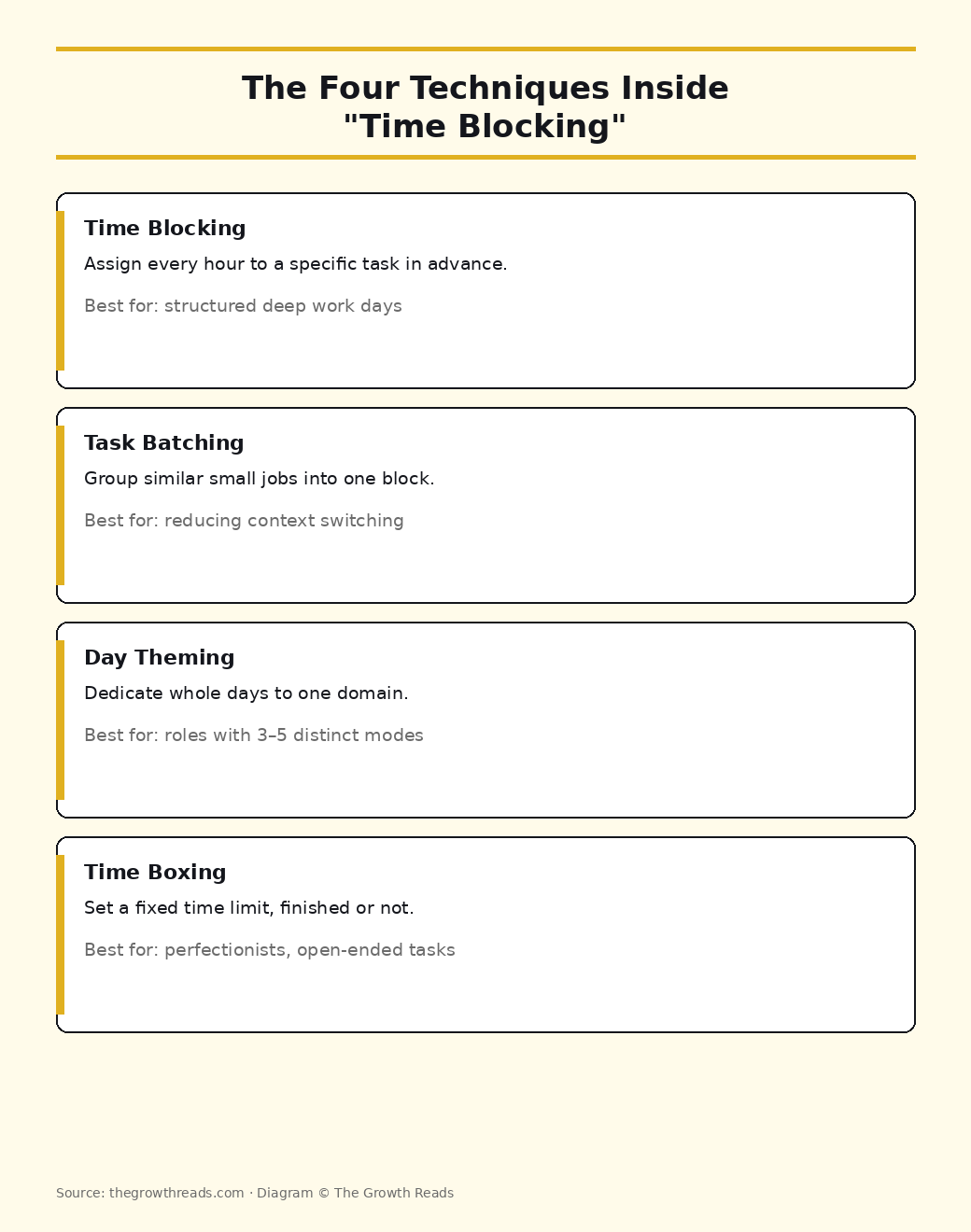
If you’ve tried time blocking and found it rigid, there’s a good chance you needed time boxing. If you found it constantly interrupted, you probably needed batching first.
Where the idea actually came from
Time blocking has three intellectual parents, and they were solving different problems.
Stephen Covey got there first with the time management matrix — the four-quadrant grid separating urgent from important. His argument in The 7 Habits of Highly Effective People was that important-but-not-urgent work (Quadrant II) never happens unless you schedule it, because urgent work will always shout louder. He developed the practical version further in First Things First: put the big rocks in the jar first, then let the sand fill in around them. Blocking is how you place a big rock.
Cal Newport gave it the modern form. In Deep Work he argues that concentration is a finite daily resource and that unscheduled time defaults to shallow work — email, Slack, small administrative tasks that feel productive and produce nothing. His prescription is uncompromising: block every minute of the workday, then revise the block when reality intervenes. Newport’s version is less about efficiency than about protecting a few hours of genuine depth from being nibbled away.
Laura Vanderkam supplies the evidence. 168 Hours is built on time diaries from people who claimed to have no free time, and it consistently found large blocks they hadn’t noticed. Her point reframes the whole exercise: blocking isn’t about squeezing more into the day, it’s about seeing where the day already goes.
How to build your first week of blocks
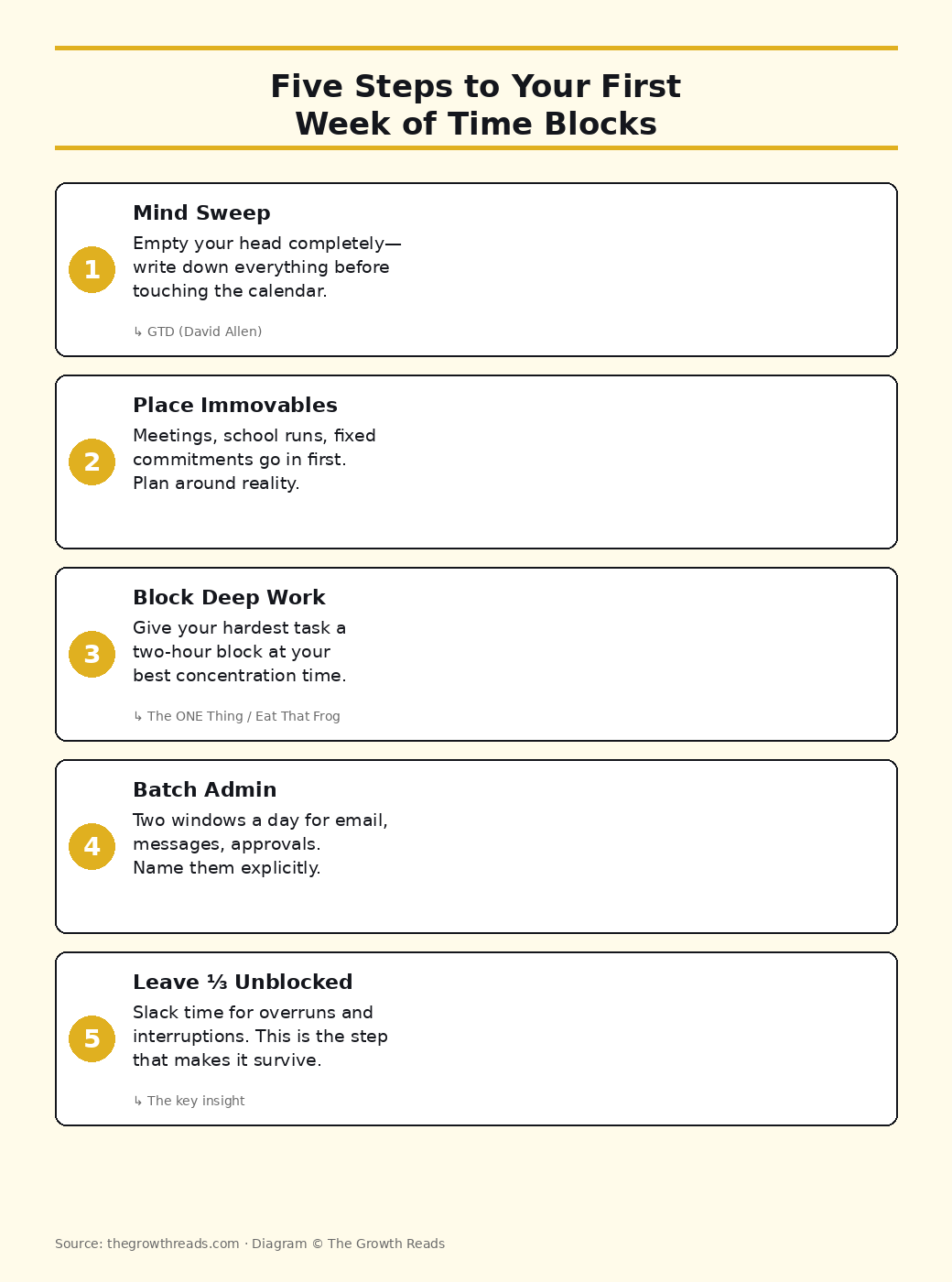
1. Empty your head before you touch the calendar
Blocking a list you haven’t seen in full produces a schedule that ignores half your obligations. David Allen’s mind sweep in Getting Things Done is the standard move here — write down everything you’re carrying, without filtering, until nothing is left in your head. It usually takes 20 minutes and produces more items than you expect.
2. Place the immovable things
Meetings, school runs, the gym class you’ve already paid for. These are the boundaries of the puzzle. Put them in first so you’re planning around reality rather than an idealised day.
3. Block your two hardest hours first
Identify the one task that would make the day worthwhile if it were the only thing you finished — Gary Keller’s framing in The ONE Thing, and the same instinct behind Brian Tracy’s Eat That Frog! Give it a two-hour block at whatever time of day your concentration is genuinely best. For most people that’s earlier than their calendar currently reflects.
4. Batch the small stuff into two windows
Email, messages, approvals, admin. Two blocks a day is enough for almost anyone who isn’t in a support role. Naming them explicitly is what stops them leaking into the two hours above.
5. Leave a third of the day unblocked
This is the step nearly every guide skips, and it’s the one that determines whether the system survives. Overruns, interruptions and genuine emergencies are not exceptions — they’re the normal texture of a week. A schedule with no slack doesn’t absorb them; it breaks.
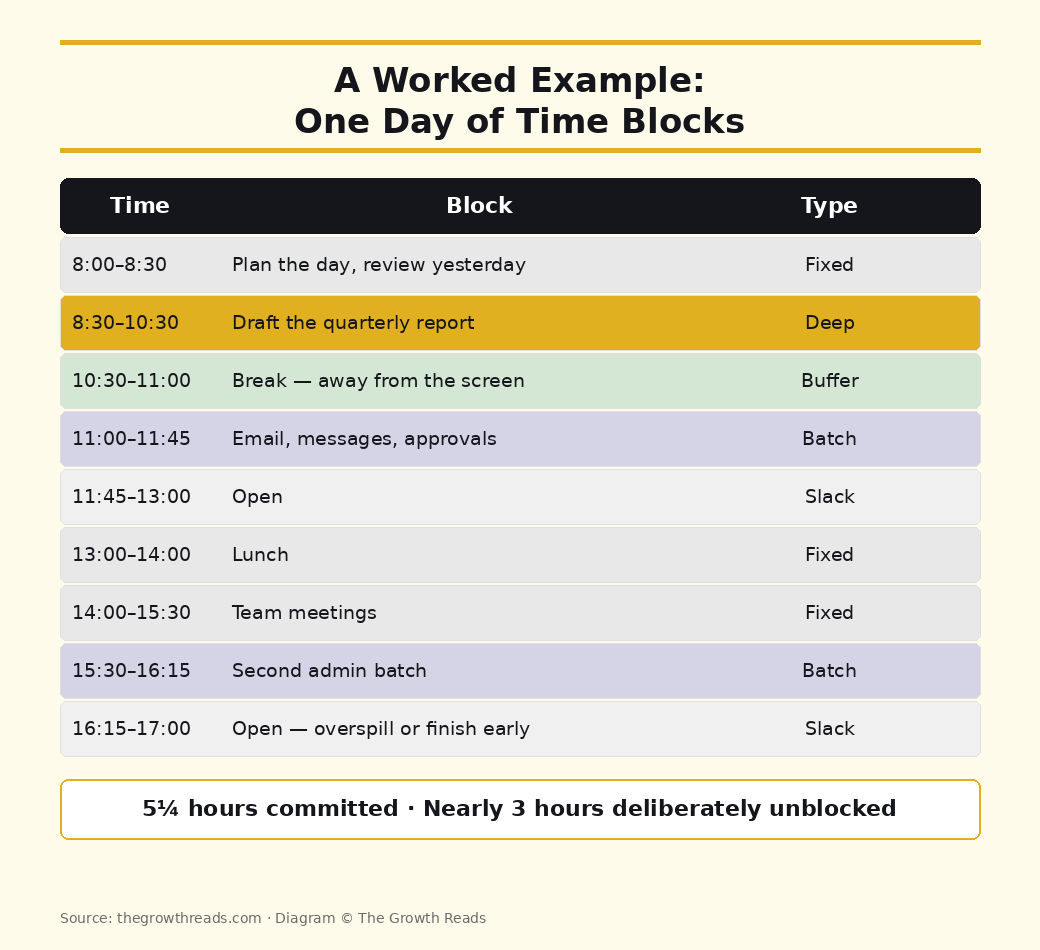
A worked example
| Time | Block | Type |
|---|---|---|
| 8:00–8:30 | Plan the day, review yesterday | Fixed |
| 8:30–10:30 | Draft the quarterly report | Deep block |
| 10:30–11:00 | Break — away from the screen | Buffer |
| 11:00–11:45 | Email, messages, approvals | Batch |
| 11:45–13:00 | Open | Slack |
| 13:00–14:00 | Lunch | Fixed |
| 14:00–15:30 | Team meetings | Fixed |
| 15:30–16:15 | Second admin batch | Batch |
| 16:15–17:00 | Open — overspill, or finish early | Slack |
Five and a quarter hours are committed. Nearly three are deliberately not. That ratio is the point.
The honest case against time blocking
You won’t often read this part on a scheduling app’s blog.
Oliver Burkeman’s Four Thousand Weeks makes the strongest argument against the whole enterprise. His claim is that efficiency systems quietly promise something they can’t deliver — that if you just organise well enough, you’ll finally get on top of everything. You won’t. The list is infinite by nature, and getting faster at clearing it mostly generates more of it. Time blocking used as a tool to fit more in is, on this reading, a trap. Time blocking used to decide what you’re deliberately not doing is something else entirely.
Burkeman’s own alternative is worth knowing, because it’s a good deal more forgiving than a fully blocked day. His 3-3-3 method allocates three hours to one significant project, three shorter tasks, and three maintenance jobs — a shape for the day rather than a minute-by-minute plan.
Two further limits worth naming. Blocking assumes control over your own calendar, which rules out a lot of shift work, clinical work and reactive support roles. And it’s a poor fit for genuinely unpredictable work — if your day is defined by what lands, batching and time boxing will serve you better than blocking will.
Common mistakes
- Blocking every minute. Newport’s version assumes you’ll revise the plan mid-day as things change. Most people copy the rigidity and skip the revision, then conclude the method doesn’t work.
- Optimistic estimates. Nearly everyone underestimates task length. Add 50% for the first fortnight and adjust from what actually happens rather than from what you hoped.
- Vague block names. “Marketing” isn’t a block. “Write the launch email” is. A vague label is a decision you’ve postponed into the moment you can least afford it.
- No buffers between blocks. Back-to-back blocks guarantee that one overrun topples the rest of the day.
- Treating the plan as a verdict. A missed block is information about your estimates, not a personal failing. The plan is a hypothesis, and the week is the experiment.
Quick-start checklist
- Do a full mind sweep — everything out of your head and onto paper.
- Put fixed commitments into the calendar first.
- Block one two-hour deep-work session per weekday, at your best hours.
- Create two admin batches a day and name them.
- Leave at least a third of the day unblocked.
- Add 50% to every time estimate for the first two weeks.
- Review on Friday: which blocks held, which didn’t, and why.
- Adjust the estimates, not your opinion of yourself.
Methodology and sources
This guide synthesises the time-blocking methods described in eight books we’ve read and reviewed in full: Deep Work (Cal Newport), First Things First (Stephen Covey), 168 Hours (Laura Vanderkam), Getting Things Done (David Allen), The ONE Thing (Gary Keller), Eat That Frog! (Brian Tracy), Four Thousand Weeks (Oliver Burkeman), and The Pomodoro Technique (Francesco Cirillo). We deliberately include counter-arguments — particularly Burkeman’s critique — because a guide that only presents the upside isn’t giving you enough to decide whether the method suits your work. Every claim is attributed to its source; no productivity tool or calendar app sponsored this article.
Frequently asked questions
What exactly is time blocking?
Assigning specific tasks to specific hours in your calendar ahead of time, so that you work from a schedule rather than an open list. The distinguishing feature is that every committed hour has a named job attached to it before the day starts.
Is time blocking actually effective?
It reliably helps with two things: protecting long stretches of concentration, and making visible how much time your commitments genuinely consume. It doesn’t help you finish everything — nothing does, and the honest writers on this subject say so. Treat it as a way of choosing what gets the good hours, not as a method for fitting more in.
What is the 3-3-3 rule, and how does it relate to time blocking?
The 3-3-3 method comes from Oliver Burkeman: three hours on one important project, three shorter tasks, three maintenance jobs. It’s a lighter-weight cousin of time blocking — it gives the day a shape without committing every hour, which makes it a good landing spot if full blocking feels suffocating. His reasoning is set out in Four Thousand Weeks.
Is time blocking good for ADHD?
Many people with ADHD find external structure genuinely helpful, and a visible calendar can offload some of the working-memory burden of remembering what’s next. The usual adaptations are shorter blocks, generous buffers, and time boxing rather than open-ended blocks. It isn’t a treatment, and what works varies a great deal between individuals — worth discussing with a clinician if you’re managing symptoms.
Do I need an app for time blocking?
No. Any calendar works, including a paper one — the technique predates every app currently marketed for it. Start with the calendar you already open every day, and only consider dedicated software once you know which parts of the method you actually use.
How is time blocking different from the Pomodoro Technique?
Pomodoro structures work within a session — 25 minutes on, 5 off. Time blocking decides which sessions exist in the first place. They stack well: block two hours for a task, then run four pomodoros inside it. Francesco Cirillo’s original method is covered in our Pomodoro Technique summary.
Related reading
- Deep Work summary — the fullest argument for blocking every minute, and why shallow work expands to fill unscheduled time.
- First Things First summary — Covey’s big-rocks method, the direct ancestor of scheduling by priority.
- Four Thousand Weeks summary — the strongest case against treating time management as a solvable problem.
- Getting Things Done summary — where the mind sweep in step one comes from.
- The two-minute rule — what to do with the tasks too small to deserve a block.
Every method above comes from a book, and we’ve summarised all of them. Browse the best productivity books, or work through every productivity summary on The Growth Reads →