

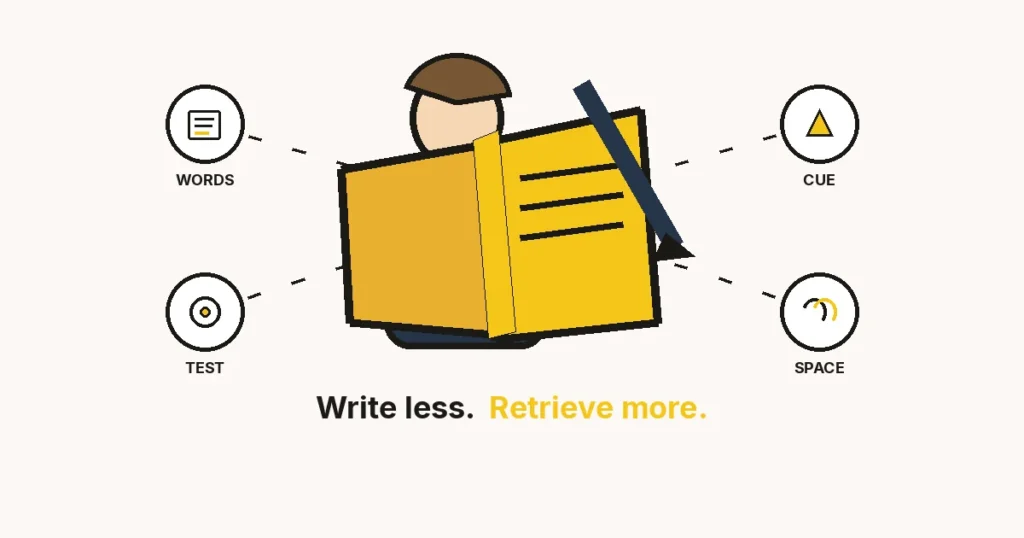
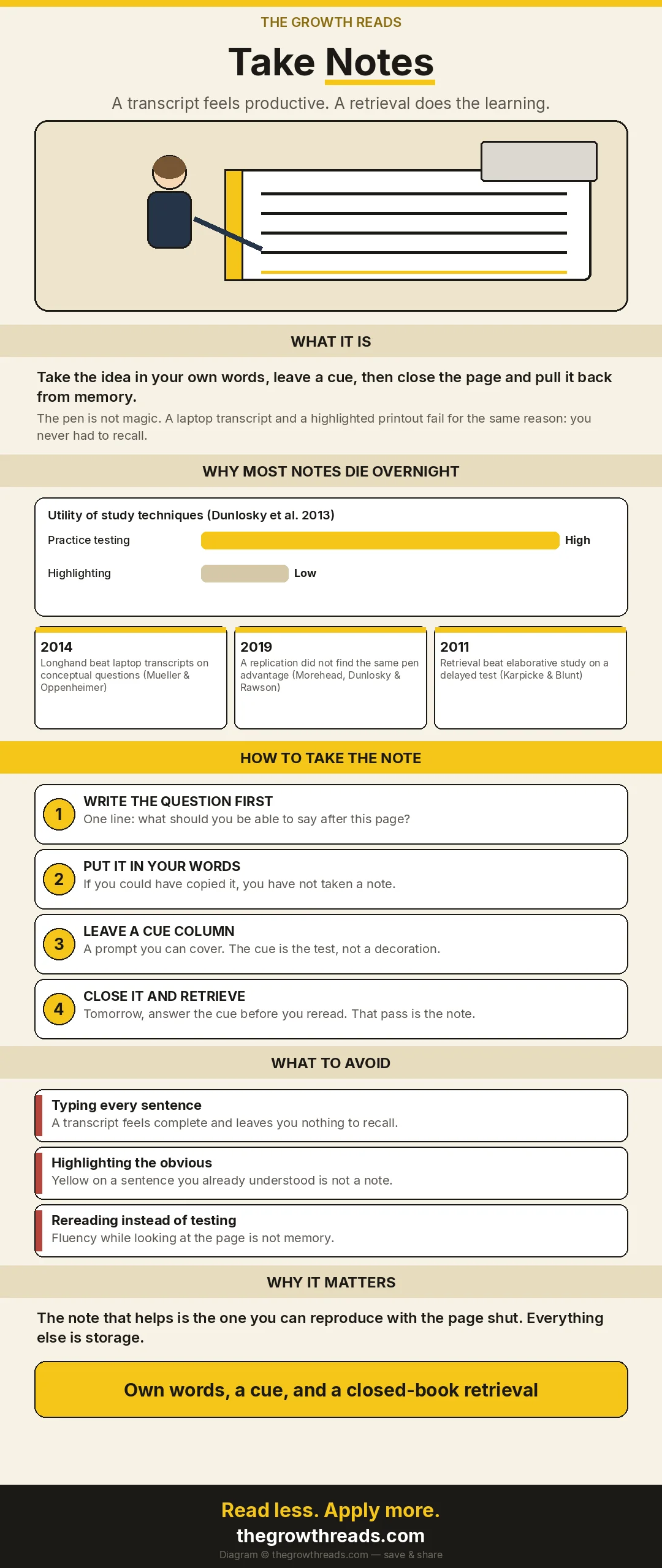
Take notes by writing the idea in your own words, leaving a cue you can cover, and closing the page to pull it back from memory. A full transcript feels productive and teaches less. The pen is not magic: a 2014 study favoured longhand, and a 2019 replication did not. What both still support is generation and retrieval, not the tool.
Key takeaways
- Write the question first. A note without a question is a filing cabinet.
- If you could have copied the sentence, you have not taken a note yet.
- Leave a cue column you can cover. The cue is the test.
- Close the page and retrieve the next day, before you reread.
- Keep a transcript only when the words themselves are the record — a quote, a number, a decision. That file is storage, not study.
What counts as a note?
A note is a prompt you can use with the source shut. If the only way the page helps you is by being open in front of you, you made a copy. Copies are sometimes the right object — meeting minutes, a quote you must not paraphrase, a figure you will cite. They are not how you learn an idea, and they are not how you remember a book a month later.
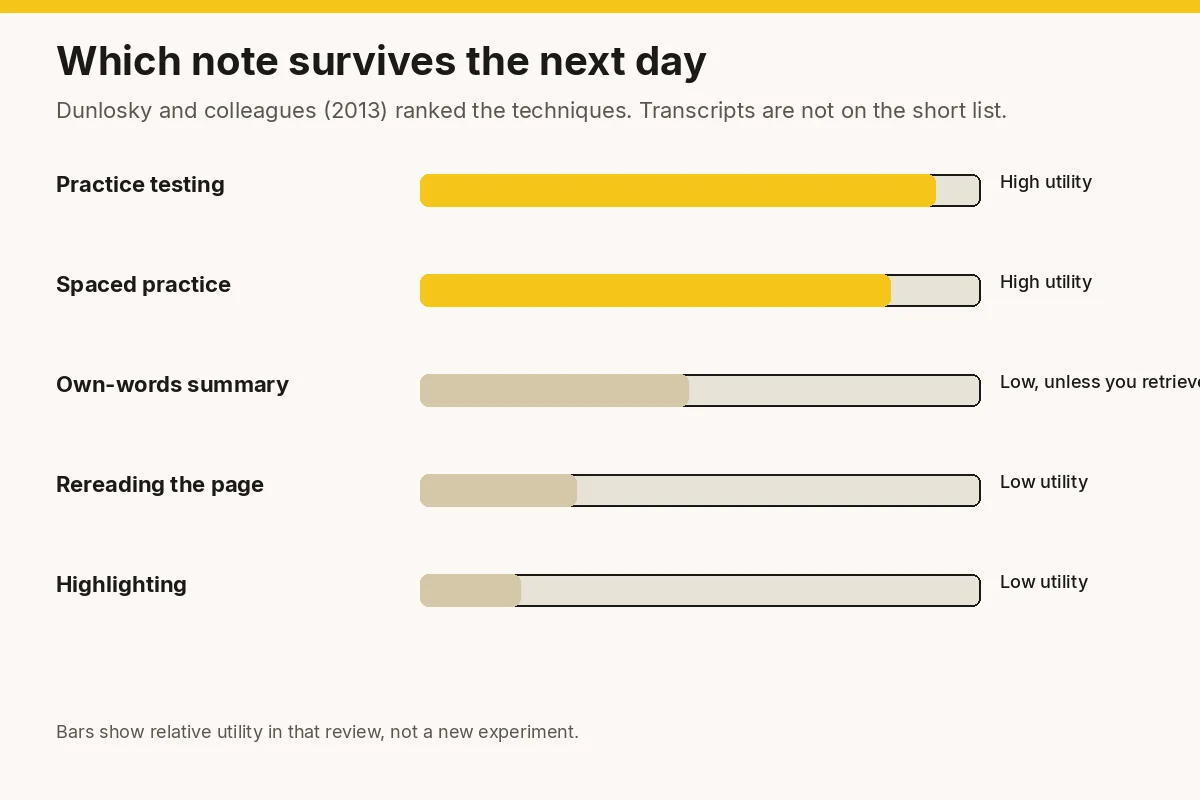
Dunlosky, Rawson, Marsh, Nathan and Willingham (2013) reviewed ten common study techniques. Practice testing and distributed practice came out with high utility. Highlighting, rereading, and summarising landed much lower. Summarising was not useless. It was unreliable, because a summary you write while looking at the page often becomes a tidy paraphrase you never have to recall. The techniques that worked forced a retrieval.
Why does a complete transcript teach so little?
Typing every sentence feels like respect for the material. It is usually the opposite. You can transcribe without deciding what the sentence is for. The page fills. Your understanding does not. Later you reread the transcript, recognise the sentences, and mistake recognition for memory. Recognition is what happens when the words are in front of you. Memory is what happens when they are not.
Karpicke and Blunt (2011) compared retrieval practice with elaborative studying that used concept maps. Students often believed the concept-mapping session taught them more. On a delayed test, retrieval won. The feeling of a rich page is a poor guide. The closed book is the guide.
This is also why a focus practice that ends in a highlighted PDF still leaks. Attention without a retrieval is a sitting. The note is where the sitting becomes something you can use on a different day.
Should you take notes by hand or on a laptop?
Mueller and Oppenheimer (2014) found that students who took longhand notes did better on conceptual questions than students who typed. The laptop group wrote more words and wrote them more verbatim. The authors argued that the transcript was the problem, not the keyboard as an object.
Morehead, Dunlosky and Rawson (2019) tried to replicate and extend that finding. They did not find the same longhand advantage. So the honest sentence is narrower than the headline you have seen: there is not a settled rule that pens beat keyboards. There is a settled problem with verbatim notes, and a laptop makes verbatim notes easy.
Use whichever tool lets you put the idea in your own words at the speed of the room. If the laptop turns you into a stenographer, close it or drop the font size and write a cue instead of a paragraph. If the pen makes you so slow that you miss the point, type the cue and the one sentence you would want to recall, and stop. Ahrens, in How to Take Smart Notes, makes the same cut: a fleeting capture is not a permanent note until you have rewritten it as an idea you could explain.
How do you take the note?
Six moves. They work for a meeting, a chapter, and a course. Skip none of the last two. Those are the ones that feel optional and do the learning.
1. Write the question before you write the note
One line at the top: what should you be able to say when this page is shut? “What is the difference between a transcript and a note?” is a question. “Chapter 4” is a label. The question decides what is worth keeping. Without it you will keep everything, which is another way of keeping nothing you can find.
2. Put the idea in your own words
Close the sentence you just read, or look away from the slide, and write what it means. If your sentence matches the source too closely, you copied. Short is a feature. A note you cannot reread in ten seconds will not get reread. Include the number, the name, and the condition if those are the point. Leave out the throat-clearing.
3. Leave a cue you can cover
A left column, a bold first line, or a flashcard front. The cue is a prompt, not a summary of the summary. “Why did the 2019 replication matter?” is a cue. The answer stays hidden until you try. Cornell’s layout — cue column, notes, a short summary at the foot — is a useful piece of furniture here. It is a layout, not a proven superiority trial. Use it because covering the right-hand page is easy, not because a study crowned it.
4. Close the page and retrieve
When the meeting or the chapter ends, shut the note. Say or write the answers to your cues. Mark the ones you missed. Do not fix them by rereading the whole page. Open only the missed line, restate it, and shut the page again. Karpicke and Blunt’s result is the reason this step exists. The retrieval is the study session. The writing was just the preparation.
5. Space a second pass
The next day, answer the cues before you look. Dunlosky and colleagues rated distributed practice as high utility for a reason: a second encounter after a gap beats a longer first encounter. Two minutes the next morning will teach you more than twenty extra minutes of highlighting tonight. Add a third pass a few days later for anything you still miss. Drop cues you can answer cleanly. A note system that never deletes becomes a second inbox.
6. File one next action, not the whole transcript
If the note creates work, write the next visible action somewhere you will see it — the task list, not the bottom of a 40-page document. “Email Sam the revised paragraph” is an action. “Notes from Tuesday’s meeting” is a place things go to die. This is the same cut as focusing while studying: the session ends with a retrieval and a next step, or it did not end.
What do you do when you are already behind?
You will not catch up by retyping last month. Pick the three sources you still need to be able to explain. For each, write five cues from memory first, even if the cues are bad. Then open the source only to repair the cues you could not answer. That hour beats an evening of reformatting old transcripts into a nicer app.
If the backlog is meeting notes nobody has read, stop taking transcript-level notes in the next meeting. Assign one person to the decisions and the owners. Everyone else writes their own cues and actions. A shared transcript plus a private cue is enough. Two full transcripts of the same hour is how teams pretend alignment.
If you are in a course and the exam is soon, retrieval beats re-copying. Make cues from the headings. Answer them cold. The pages you cannot answer are the only pages worth rereading.
What does one good page look like?
Take a chapter you actually need. At the top, write the question the chapter is supposed to answer. Under it, five cues in the left margin and one sentence each on the right, in your words. At the foot, one line: the next thing this chapter changes in your work. That is a page. It should fit on a screen without scrolling twice.
Here is the shape, using this article as the source so you can see the cut.
- Question: What makes a note different from a copy?
- Cue: Why did the 2019 paper matter? Answer, covered: It blocked the claim that pens always beat laptops. The failure is the verbatim transcript.
- Cue: What did Karpicke and Blunt find? Answer: Retrieval beat elaborative concept-mapping on a delayed test. Students felt the opposite during study.
- Cue: What is the cue column for? Answer: It is the test. Cover the notes and answer it. The layout is furniture. The retrieval is the method.
- Next action: Turn tomorrow’s meeting into five cues and one action, not a transcript.
A meeting page is shorter. Decisions, the name of the owner, the date, and your action. If someone needs a record of the argument, that is a shared document with one author. Your note still has to survive with that document closed. Write the decision in a sentence you would be willing to repeat on Thursday without opening the doc.
A course page is the chapter shape, plus a spacing mark. After the first retrieval, write the date of the next pass in the corner. When that date arrives, answer before you look. If you answer cleanly, retire the cue. A binder that grows forever is not a system. It is an archive you are afraid to trust.
Quotes and figures have a different rule. If the exact words or the exact number are the evidence, copy them and tag them as a quote, with the source line. Then write, underneath, what you are using the quote to show. The quote is storage. The sentence under it is the note. Mixing them is how a page becomes a scrapbook you cannot study from.
What should happen in the ten minutes after the sitting?
Do not reorganise the app. Do the retrieval while the cues are still clumsy. Clumsy is useful. You find out which lines were copied. Fix only those lines, in your own words, and shut the page. Then move the single next action to the list you actually open in the morning.
If you took notes for someone else — a manager, a client, your future self in three weeks — add one sentence at the top in their language: the decision, or the thing that changed. People do not read your cue column. They read the first line. You still keep the cues, because you are the person who has to remember it.
Once a week, spend ten minutes retiring cues you can answer without looking. That small deletion is the maintenance Dunlosky’s “distributed practice” finding implies and that note apps never remind you to do. A system you only add to will bury the three cues that mattered under the thirty you captured because the speaker was fast.
Where do recordings and automatic transcripts fit?
A recording is a source, like the chapter. It is not the note. An automatic transcript is the laptop problem from Mueller and Oppenheimer, produced without your hands. It will be more complete than anything you would have typed, and it will demand even less generation. If you keep it, keep it as the archive you can search when a number is disputed. Then write the five cues as if the transcript did not exist. Open it only to repair a cue you missed.
Listening at 1.5x and highlighting the transcript is rereading with extra steps. Dunlosky’s review already ranked rereading as low utility. Speed does not promote it. The pass that counts is still the one with the transcript closed.
There is a narrow case for not taking a generative note at all: you are the record-keeper for other people, the words will be quoted, and nobody needs you to remember the argument. Then write the shared record cleanly, label it as minutes, and separately write your own three cues if you personally have to act. Do not pretend the minutes were your study notes. They were a document. Documents and notes fail in different ways, and mixing the jobs is how you end up with neither.
If a tool offers to “summarise the meeting into action items,” read the actions and rewrite any that you own into a sentence with a date. A summary you did not generate has the same weakness as a highlight: it feels done. Check it against the question you wrote at the start of the meeting. If the summary does not answer that question, it answered a different meeting.
Which habits feel like note-taking and are not?
Highlighting the sentence you already understood. The marker records recognition. Dunlosky’s review put highlighting in the low-utility group. A highlight with a cue written in the margin is a different object. The cue is the note. The yellow is optional.
Changing apps. A new notebook will not retrieve for you. Move the cues if you must. Do not spend the evening building a system you will demonstrate once.
Writing in the author’s words so you “don’t lose the nuance.” Nuance you cannot restate is nuance you do not have. Paraphrase, and keep a short quote only when the wording is the evidence.
Rereading the note as the review. Rereading is comfortable because the page completes your sentences. Comfort is the warning. If you want to know whether the note worked, cover it.
What does the research actually support?
| Claim | Source | What it does not say |
|---|---|---|
| Practice testing and spacing have high utility. Highlighting and rereading have low utility. | Dunlosky et al., 2013, Psychological Science in the Public Interest | It does not rank Cornell against Zettelkasten. It ranks the mental act, not the stationery brand. |
| Longhand notes beat laptop transcripts on conceptual questions in one set of studies. | Mueller & Oppenheimer, 2014, Psychological Science | It does not prove pens are superior in general. The laptop group wrote more verbatim text. |
| A later replication did not find that longhand advantage. | Morehead, Dunlosky & Rawson, 2019, Educational Psychology Review | It does not rehabilitate verbatim transcripts. It blocks the “pen always wins” slogan. |
| Retrieval practice beat elaborative concept-mapping on a delayed test, even though students felt the opposite. | Karpicke & Blunt, 2011, Science | It does not say concept maps are useless as a note format. It says the retrieval was the stronger study session. |
Frequently asked questions
How do you take notes so you actually remember them?
Write a question, answer it in your own words, and test yourself with the page shut. Repeat the test the next day before you reread. A complete transcript you never retrieve will feel safer and leave less behind.
Is it better to take notes by hand?
Sometimes, and not as a rule. Mueller and Oppenheimer (2014) found a longhand advantage on conceptual questions. Morehead, Dunlosky and Rawson (2019) did not replicate it. Prefer the tool that stops you copying every sentence. The failure mode is the verbatim transcript, which a laptop makes easy.
What is the Cornell note-taking method?
A page split into a cue column, a notes column, and a short summary at the bottom. You cover the notes and answer from the cues. It is a useful layout because the test is built into the page. It is not a method that has been shown to beat every other layout in a head-to-head trial. The retrieval is the active ingredient.
How many notes should you take in a meeting?
Decisions, owners, dates, and your own next action. Plus any number or quote you would not trust yourself to remember. A full record of who said what belongs to one shared transcript, if you need it at all. Your private note is the cue and the action.
Should you highlight textbooks?
Only as a pointer to a cue you also write. Dunlosky and colleagues rated highlighting as low utility on its own. A marked sentence you can already recognise is not a retrieval. Write the question in the margin and answer it later with the book closed.
What if you type faster than you think?
That speed is the risk. Slow the note to one cue and one sentence in your own words per idea. Leave the rest. You can always reopen the recording or the chapter for a fact. You cannot retrieve a page you never generated.
Related reading
- How to focus better — the parent page. A note cannot save a sitting that was already split across five tabs.
- How to focus while studying — the same retrieval rule applied to a study block.
- How to Take Smart Notes summary — Ahrens on rewriting a fleeting capture into a note you could explain.
How this article was researched
The Growth Reads editorial team used Dunlosky et al. (2013), Mueller and Oppenheimer (2014), Morehead, Dunlosky and Rawson (2019), and Karpicke and Blunt (2011). The 2019 paper is included because it complicates the popular “pen beats laptop” line, and leaving it out would have made this page more confident than the evidence. Cornell is described as a layout. Ahrens is labelled as a book, not as a trial.
This article contains no medical advice. Note-taking is a study and work practice, not a treatment for attention disorders.
How we work: every article on The Growth Reads is built from the books in our library plus the research they rest on, and is reviewed and date-stamped when the evidence changes. Read our full methodology.
Sources
- Dunlosky, J., Rawson, K. A., Marsh, E. J., Nathan, M. J., & Willingham, D. T. (2013). Improving students’ learning with effective learning techniques: Promising directions from cognitive and educational psychology. Psychological Science in the Public Interest, 14(1), 4–58.
- Mueller, P. A., & Oppenheimer, D. M. (2014). The pen is mightier than the keyboard: Advantages of longhand over laptop note taking. Psychological Science, 25(6), 1159–1168.
- Morehead, K., Dunlosky, J., & Rawson, K. A. (2019). How much mightier is the pen than the keyboard for note-taking? A replication and extension of Mueller and Oppenheimer (2014). Educational Psychology Review, 31, 753–780.
- Karpicke, J. D., & Blunt, J. R. (2011). Retrieval practice produces more learning than elaborative studying with concept mapping. Science, 331(6018), 772–775.
- Pauk, W., & Owens, R. J. Q. (2013). How to Study in College. The Cornell layout. Used here as a page structure, not as a trial result.
- Ahrens, S. (2017). How to Take Smart Notes. The rewrite from fleeting capture to a permanent note. See our review.