

★★★★☆ 4.4/5 — the shortest honest map in print for a digital life that is drowning in folders named by topic.
Best for: Knowledge workers whose notes and Drive already exist, but nothing ever leaves the “active” pile
Reading time: ~3.5 hours (208 pages) · this guide ~12 min
Difficulty to apply: Easy to install, honest to maintain — the work is the weekly project list, not the four folders
The PARA Method in one minute
Stop filing by topic. File by what you will do next.
Tiago Forte’s The PARA Method is a 208-page companion to Building a Second Brain. You already capture. The leak is that “Marketing,” “Health,” and “Random PDFs” do not tell you what is live this week. PARA gives you four buckets — Projects, Areas, Resources, Archives — ordered from hottest to coldest. Install the same four names in every app. Keep a project list with actual finish lines. Move finished work to Archives so search still works and your Tuesday screen does not.
Key takeaways
- Four buckets, not infinite topics: Projects, Areas, Resources, Archives cover every file you will ever keep.
- Actionability over subject: A nutrition note belongs in a 30-day cut or in Health — not in a folder called “Nutrition.”
- Projects have a finish line: If it cannot complete, it is not a project. It is an Area wearing a costume.
- Areas have a standard: Health, finances, the team. You hold a bar. You do not “finish” them.
- Resources are later: Topics you might use. Useful, not urgent. Close them during deep work.
- Archives are cold storage: Inactive, still searchable. The point is to get them off the hot list, not to delete your past.
- Same names everywhere: Notes, Drive, bookmarks, email. One map, many tools. No PARA plugin required.
- Do not migrate the decade: Start from today. Old piles go to Archives or a dated pre-PARA folder.
- The project list is the focusing tool: If it is not on the list, it is not a commitment. Scan it weekly in 15 minutes.
- PARA is Organize, not the whole CODE loop: Capture and Express still live in Building a Second Brain.
What is The PARA Method about?
The PARA Method is Tiago Forte’s four-folder system for organizing digital life by actionability: Projects you are finishing, Areas you are holding, Resources you might use, and Archives you keep for search. It is a short, practical companion to Building a Second Brain, designed to be installed in minutes in the apps you already use.
About the author
Tiago Forte is a productivity consultant and the founder of Forte Labs. He spent years teaching knowledge workers how to keep ideas from vanishing across apps, then published Building a Second Brain, the CODE method for capturing and using what you read. The PARA Method (2023) is the shorter companion: once you have notes, you still need four folders that match how work actually moves. Forte has taught the system to teams at companies including Toyota and Genentech. The claim is deliberately small — install it in minutes, then spend the saved attention on finishing projects instead of re-filing them. Explore all Tiago Forte book summaries →
Key concepts at a glance
| Concept | What it means | Use it when |
|---|---|---|
| Projects | Short-term work with a goal and a finish line | You can name “done” in one sentence |
| Areas | Ongoing roles with a standard, no end date | Health, money, the team, a craft you keep |
| Resources | Topics of interest, not currently driving a deadline | You want the PDF later, not this afternoon |
| Archives | Inactive items from the other three, kept for search | The project shipped and is still cluttering the hot list |
| Actionability | File by how soon you will use it, not by school subject | Your folders look tidy and still hide this week’s work |
| Project list | One list of live finish lines — the focusing tool | Your calendar and your folders disagree |
| Start from now | Do not migrate the decade on day one | A Sunday “file everything” plan is forming |
| Same map, every app | The four names repeat in notes, files, and bookmarks | Each tool has its own private taxonomy |
Part 1: Four buckets, one rule
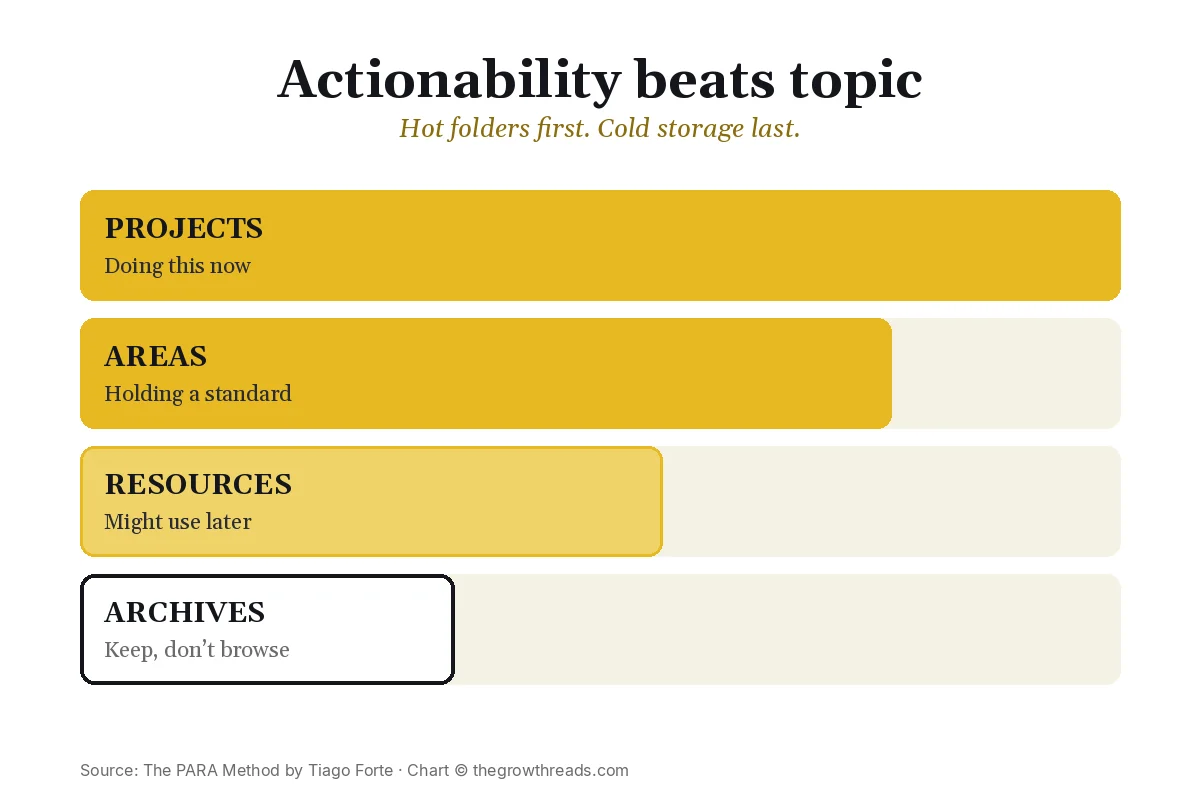
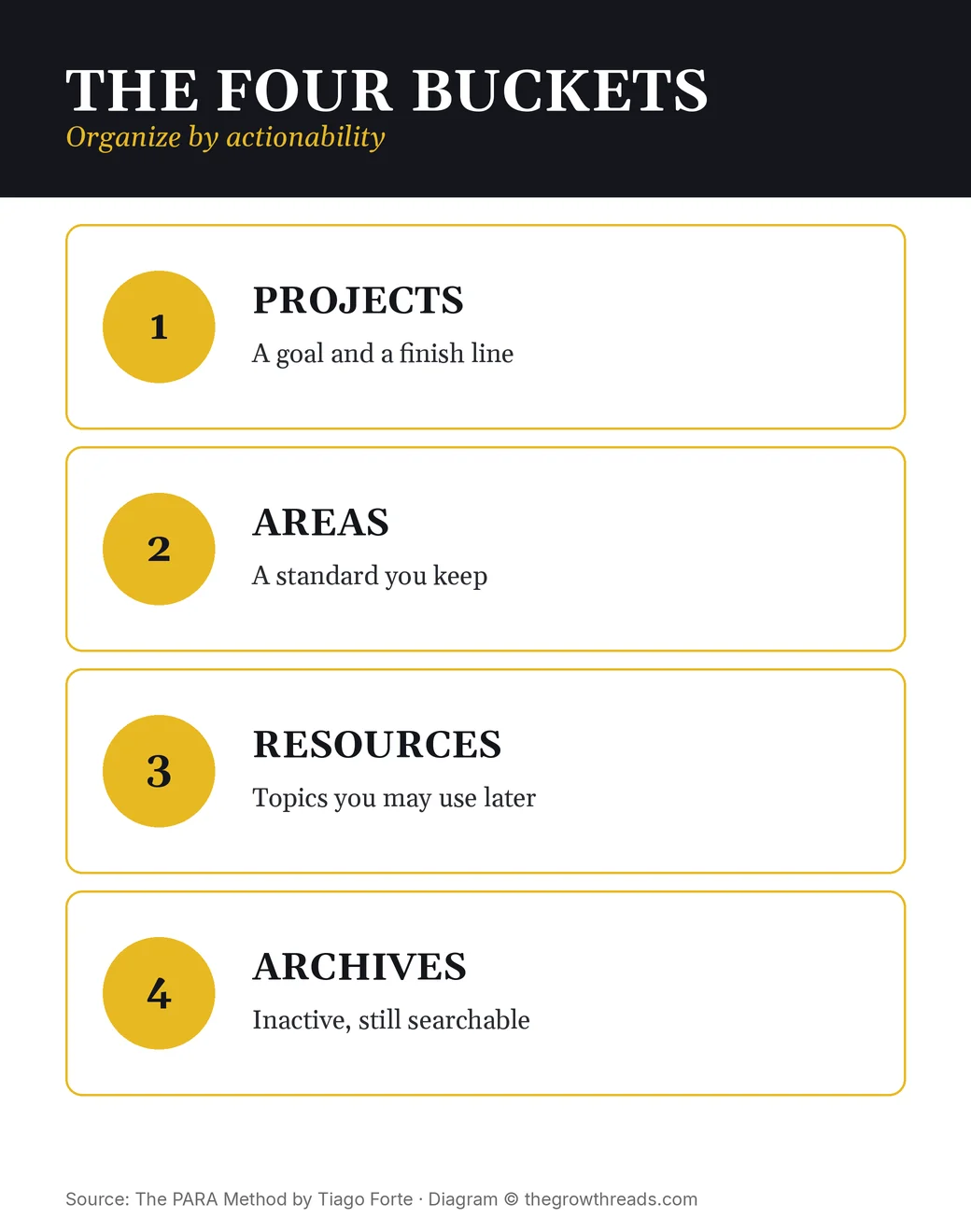
Forte’s opening move is almost rude in its smallness. You do not need a new app. You need four places, ordered from most actionable to least. Projects sit at the top because they have a finish line: the Q3 report, the landing page, the kitchen renovation. Areas sit under them because they never complete; they have a standard. Resources sit under that because they are interesting, not live. Archives sit at the bottom because they are cold on purpose.
The rule that makes the four names worth using is actionability. A note about nutrition is not “a nutrition note.” It is either fuel for a project with a date (“30 days without takeout”) or it belongs in the Health area, or it is a recipe collection you might want later (Resources), or it is last year’s diet PDF (Archives). Topic filing feels organized and then fails the Tuesday test: when you sit down to work, the folder named by subject still makes you hunt.
PARA is also a permission slip to keep things. Archives are not the trash. Forte wants search as a safety net, not a purge. He asks you to stop mixing temperatures: hot work visible, cold work findable.
TGR Note: PARA is the O in CODE. Building a Second Brain is how information gets captured, distilled, and turned into output. This book does not replace that loop. It answers the mess that appears after you finally start taking notes: where does this file live so that next week you can find the live work in one glance? If you only install PARA and never capture, you will have four empty folders. If you only capture and never PARA, you will have a second brain with no working surface.
Part 2: Projects vs Areas
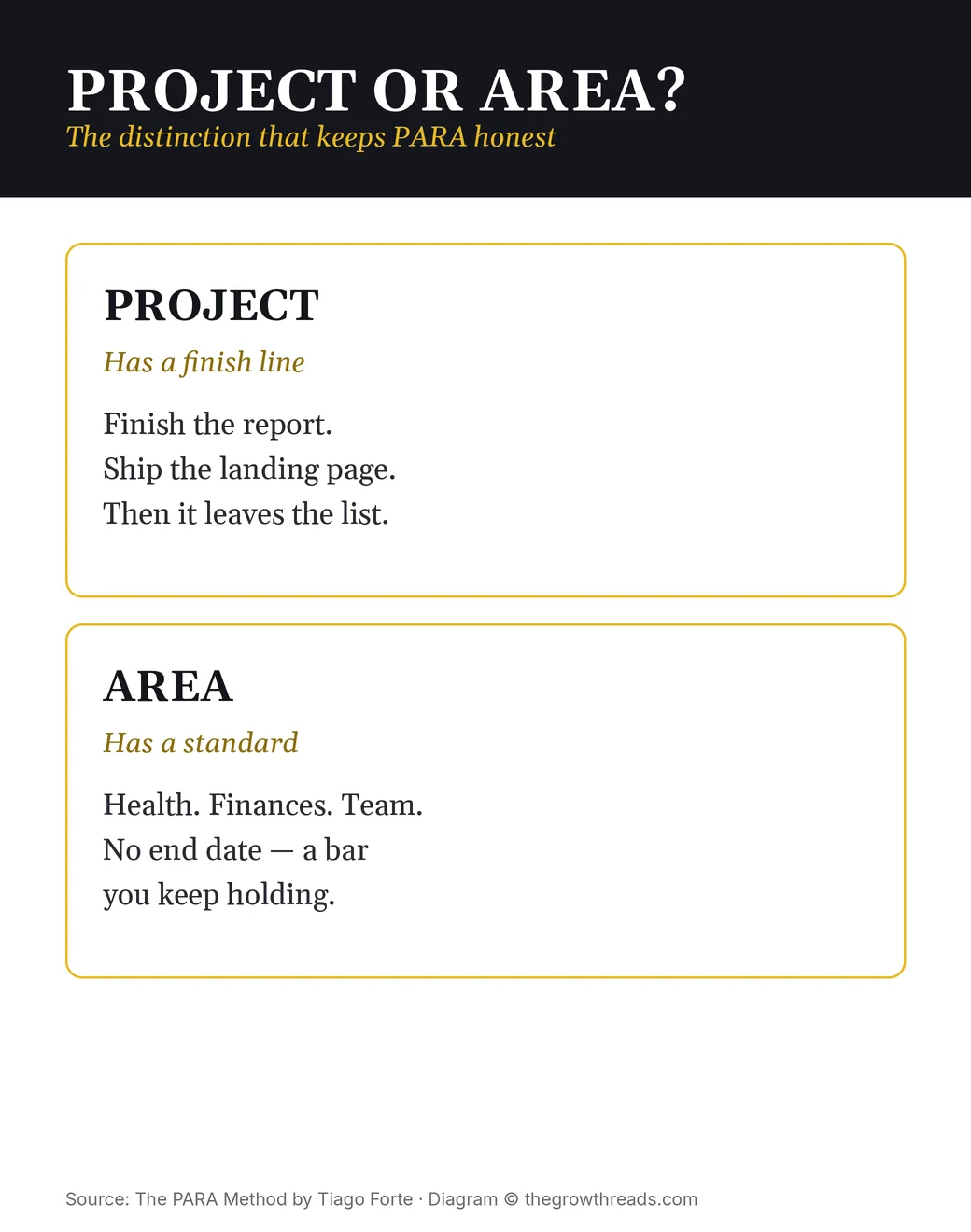
The most expensive mix-up in personal systems is calling everything a project. “Get healthier.” “Be a better manager.” “Learn Spanish.” None of those have a finish line, so they sit on the list forever and train you to distrust the list. Forte’s split is blunt. A project can complete. An area cannot. Health is an area. “Run a 10K on 12 October” is a project that lives inside it. When the 10K is done, the project goes to Archives. Health stays.
This is also how PARA creates focus without a new philosophy of life. You are allowed only so many Projects before the list stops being scannable. Areas can be few and stable — the roles you actually hold. Resources can be many; they are not asking for calendar time. The pressure belongs on the project list, which is why Forte treats that list as a secret weapon. If a piece of work is real, it has a name, a finish line, and a folder. If it is a vibe, it is an Area or it is not a commitment yet.
Use the test on one ugly item this week. Open the thing you have been “working on” for three months. Can you write the done-state in one sentence with a date? If yes, it is a project — give it a folder and a date. If no, promote it to an Area with a standard you can see (“two training sessions a week”) or demote it to Resources until you are willing to name a finish line. The honesty is the system. The folders just make the honesty visible.
TGR Note: David Allen already split projects from areas of responsibility in Getting Things Done. PARA does not replace GTD’s next-action lists. It gives those lists a house. GTD answers “what is the next physical step?” PARA answers “which folder is this week’s live work in?” If your Next Actions list is honest and your Drive is still a junk drawer, you do not need another capture tool. You need the four names. If your folders are perfect and you still freeze on Tuesday, you need GTD’s next action, not another taxonomy.
Part 3: Install PARA in any app in minutes
Forte is allergic to weekend overhauls. The install is: create four top-level folders with the same names in every tool you actually open. Notes app. Cloud drive. Maybe bookmarks. Maybe email labels. You are not building a new cathedral. You are putting the same street signs on every block so your brain stops re-learning a map per app.
Then you stop. You do not spend Sunday dragging 2019 into Projects. You put today’s live work in Projects or Areas, and you park the old pile in Archives or a dated “pre-PARA” folder. The next time you open an old file because you need it, you file that one file correctly. Search still finds the rest. Completeness is a vanity metric. A project list you trust is the real one.
The same-names rule is the part people skip, then wonder why PARA “didn’t work in Notion.” If Drive says Projects and Notion says “Active” and Apple Notes says “Work,” you did not install PARA. You installed three moods. Match the four words. During a deep-work block, close Resources and Archives in that app. The working surface should look hot: current projects, maybe the area they sit in. Everything else is a search away, which is the point of Archives.
TGR Note: If you write for a living, How to Take Smart Notes is a different Organize: Zettelkasten cards that argue with each other. PARA will still hold the project folder that contains the draft. Use Smart Notes when the unit of work is an idea you will reuse in prose. Use PARA when the unit of work is a file you must find on Tuesday. The Organized Mind is the science under both: offload what you can see so working memory can do the job in front of you. The how-to companion on this site, how to set up the PARA method, is the install checklist. This page is the book.
Part 4: Reviews, archives, and finishing
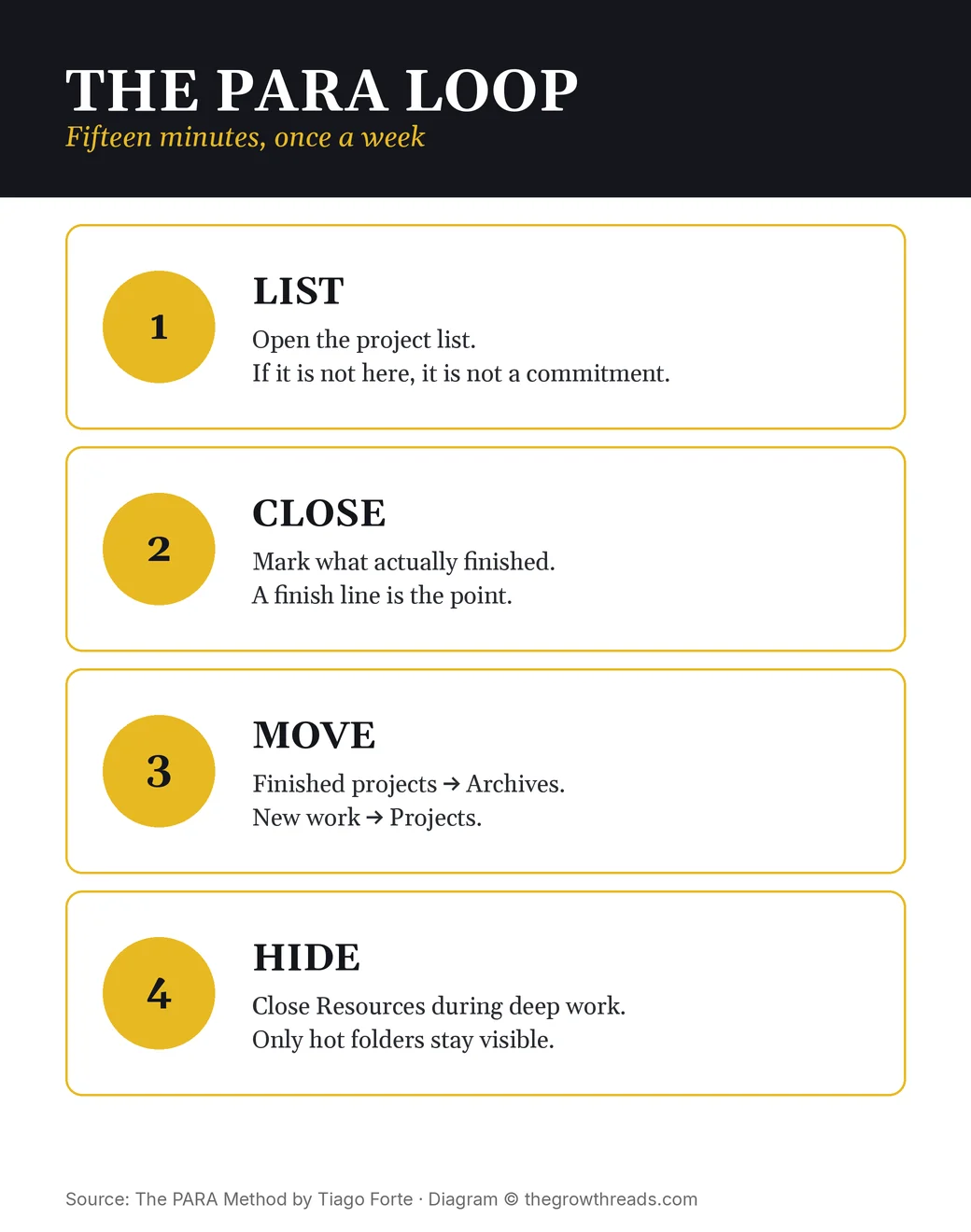
PARA dies in the same place every other system dies: you never look at it. Forte’s maintenance is a short weekly pass, not a new religion. Open the project list. Compare it to the calendar. Close what actually finished. Move those folders to Archives. If a project has stalled for weeks with no finish line, it was probably an Area or a wish — rename it. The review is 15 minutes because the list is small. If the list is not small, you do not need a better review template. You need fewer active projects.
Archives are the unsung feature. People treat archive as failure, then leave completed work in Projects until the hot list is a museum. Moving a finished project to Archives is the ceremony that makes room for the next finish line. You are not deleting the work. You are telling next-week-you that this is no longer the job. Search remains. The Desktop does not.
Used this way, PARA is a finishing system disguised as a filing system. The four folders are furniture. The project list is the focusing tool. The weekly move to Archives is how you prove that work ends.
Who is The PARA Method best for — and who should read something else first?
Best for people who already have notes, Drive, and bookmarks, and who lose the week inside them. If you can describe your mess as “I know I saved it somewhere,” this is the map. It is also the right first Forte book if you want a two-hour read you can install the same afternoon.
Read something else first if you do not capture at all — start with Building a Second Brain. If the freeze is “I don’t know the next physical step,” start with Getting Things Done. If the freeze is attention, not folders, start with Deep Work. If you want a writing-first network of notes, start with How to Take Smart Notes. PARA will still be waiting when the working surface exists.
Questions to reflect on
- What is on your project list that has no finish line? Name it as an Area or kill it as a wish.
- Where does this week’s live work actually live — and how many names does that folder wear across apps?
- Which “active” folder is really a museum of finished work that should already be in Archives?
- If you closed Resources and Archives for one 90-minute block, what would remain on screen?
- What would “done” look like for your noisiest current project, in one dated sentence?
🔥 Ready to stop filing by topic?
Get Forte’s four-folder map in the original book, then run the 7-day plan below.
How to apply The PARA Method (7-day plan)
- Day 1 — Name the finish lines. Open a blank note. Write every active commitment. If it has no finish line, it is not a project. Park it as an Area.
- Day 2 — Four folders in notes. Create Projects, Areas, Resources, and Archives at the top level of your notes app. File today’s live notes only.
- Day 3 — Four folders in files. Repeat the same four names in Drive or Dropbox. Do not migrate old files. File only what you touch today.
- Day 4 — Sort twenty. Take your last 20 notes or downloads and drop each into a bucket. If you hesitate, Archives. Speed beats a perfect taxonomy.
- Day 5 — Kill one fake project. Find a someday with no date. Give it a finish line this month, or demote it to an Area or Resources.
- Day 6 — Fifteen-minute review. Compare the project list to the calendar. Close one finished project. Move its folder to Archives.
- Day 7 — Hot-folder deep work. Do one block with only Projects visible. Resources and Archives stay closed. Notice whether the map matches the work.
Frequently asked questions
What is The PARA Method about in one paragraph?
The PARA Method is Tiago Forte’s field guide for sorting files, notes, and bookmarks into four buckets: Projects, Areas, Resources, and Archives. You organize by how soon you will use the information, not by school-style topics. Projects have a finish line. Areas have a standard you keep. Resources are topics you might need later. Archives are inactive items you still want to search. The book is a companion to Building a Second Brain. Install the four folders in the apps you already use, keep a current project list, and move finished work out of sight.
Do I need to read Building a Second Brain first?
You can install PARA without it, because the folder map stands on its own. PARA is the Organize step. Building a Second Brain is Capture, Distill, and Express — how notes get in and how they become finished work. If you never write anything down, start with Building a Second Brain. If you wrote everything down and now have forty fake projects, start here. Many readers do both: PARA for the map, CODE for the flow. Neither book asks you to switch tools.
How is PARA different from Getting Things Done?
Getting Things Done is a next-action system: capture everything, clarify the next physical step, and park the rest in lists you trust. PARA is a folder map: four top-level places that match how soon you will use a file. They sit well together. GTD tells you what to do next on Tuesday. PARA tells you which Drive folder that Tuesday belongs in. If your pain is an overflowing Next Actions list, read GTD. If your pain is a Desktop named Final-v7, read PARA. Plenty of people run GTD lists inside PARA’s Projects folder.
How long does PARA take to set up?
The first pass is minutes, not a weekend. Create four top-level folders — Projects, Areas, Resources, Archives — in your notes app and in cloud files. Put today’s live work in Projects or Areas. Do not migrate ten years of old files on day one. Start from now and let Archives collect what you are not touching. The honest project list takes longer than the folders: write every active commitment with a finish line, and demote anything that is actually an Area. A 15-minute weekly pass keeps the map from rotting.
Which apps does PARA work in?
Any app that can hold four top-level folders or notebooks: Apple Notes, Notion, Evernote, Obsidian, Google Drive, Dropbox, email labels, even a bookmarks bar. The same four names should appear everywhere, so your brain is not learning a new taxonomy per tool. You do not need a PARA plugin. If a tool cannot nest folders, use four tags or four pages with the same names. During deep work, close Resources and Archives so only hot folders stay on screen. You should be able to switch tools without rebuilding your life.
Should I migrate years of old files?
No. Dumping a decade of Desktop chaos into four folders on one Sunday is how PARA dies in week two. Freeze the old pile, put it in Archives or a dated “pre-PARA” folder, and sort only what you touch from today. The next time you need an old file, file that one file correctly. Search still finds the archive. You stop paying a migration tax for files you will never open. If a current project needs a cluster of old notes, move that cluster only. Completeness is not the goal. A trustworthy project list is.
How do I keep PARA from rotting after a month?
PARA rots when Projects and Areas get mixed, and when finished work stays in the hot folders. Protect it with one weekly pass: open the project list, close what finished, move those folders to Archives, and hide Resources during deep work. If a “project” has no finish line, it is an Area — rename it. Keep the project list short enough to scan in one screen. If it no longer fits, you do not need more folders. You need fewer active commitments. The 15-minute review is the maintenance.
Related summaries
- Building a Second Brain Summary & Review
- Getting Things Done Summary & Review
- How to Take Smart Notes Summary & Review
- The Organized Mind Summary & Review
- Best Productivity Books
How we analyze books: every book on The Growth Reads is read cover to cover, summarized in thousands of words of original analysis, and rated against our five-criteria rubric (lasting impact, evidence quality, practical application, writing & originality, external consensus). Read our full methodology.